Yesterday was quite a day. Stressful and intense are two words that come to mind when I think about it. I admitted my daughter to the hospital for an overnight treatment to help fight a nasty virus in her newly transplanted kidney.
As I packed my bag for the trip, I assured myself that everything would be fine, and my daughter wouldn’t be too upset about this hospitalization.
We’ve done this before, I thought. I am fine with going back to the hospital. We know so many of the nurses and can navigate that children’s hospital like pros. It’s just a one-night stay. We’ve had to stay for weeks in the past. One night is nothing. She won’t mind. We will make it as enjoyable as possible. We will play Candy Crush and watch a movie together and make the best of a crappy situation.
Well, I must have been in denial. My daughter was horrified to learn that we would have to stay overnight. The last time she was admitted to the hospital, she endured weeks of painful, extensive treatments and tests. Coming back to the same hospital and being re-admitted must have triggered terrible memories. It was tough for me to see her so upset.
I was in for a huge shock when it dawned on me that this hospitalization was hard for me, too. I really thought it would be fairly easy to handle, but I found it to be sweat inducing, nerve wracking, frustrating and downright difficult. It was nearly 11 pm when the treatment finally began, and I was completely spent. We hadn’t yet started the movie that we planned to watch, we hadn’t gone to the gift shop to buy bags of popcorn, and we hadn’t done anything that we had intended to do to make the hospital stay a bit easier. I was sprawled on the rollaway cot in the hospital room, and I didn’t even have the energy to walk to the bathroom. Every inch of my body was exhausted, and my brain felt like it stopped functioning. I’m not sure why it suddenly crossed my mind to meditate right then and there, but that’s exactly what I did. I didn’t have the energy to sit up. I didn’t even have the energy to clear my mind on my own.
But I did find the energy to pull my iphone out of my pocket and open the Headspace app. I listened to a free 10-minute guided meditation, and when it was over, I opened my eyes, and I was completely rejuvenated. I felt like I had slept for hours. I’ve NEVER experienced anything like that before. I’ve heard that meditation is quite powerful and can have a restful effect on the body, but I have never personally experienced such rejuvenation after 10 minutes of anything!
I guess there’s a first time for everything, and I’m thankful that this particular first time happened to occur during this stressful experience at the hospital. It probably helped that this wasn’t my first time meditating, and it probably also helped that I had a daily meditation practice— but I’ve only been meditating on a regular basis for about two and half months. If I can create a successful meditation experience that is both restful and rejuvenating with just a couple of months of practice, I know you can, too. If you are interested in creating a regular meditation practice, begin by reading some of my tips for getting started. Then, go ahead and download the Headspace app. Give the 10-day program a try. It’s not overwhelming, and I know you have 10 minutes to spare.
Please note that I do not work for Headspace, I am not paid by Headspace. I do not benefit in any way by telling you about this Headspace app. This is just part of my personal journey, and I want to share whatever happens to be working for me.
Here’s a quick summary of what I’ve discovered so far (which isn’t a lot because I’ve only recently started using it):
Headspace is an app that offers you the basics of meditation in a free 10-day program called Take10. Each day, you listen to a 10-minute guided meditation. It’s simple. You put your headphones on and tune into the instructor’s voice for ten minutes. You don’t have to think about setting a timer or finding background music or wondering if you can tune into your breath. The instructor tells you exactly what to do, and that’s what makes it so easy. It takes all of the thinking out of the process, which is exactly what you need as a beginner.
If you give the app a try, please leave a comment and let me know! Share your journey with us!

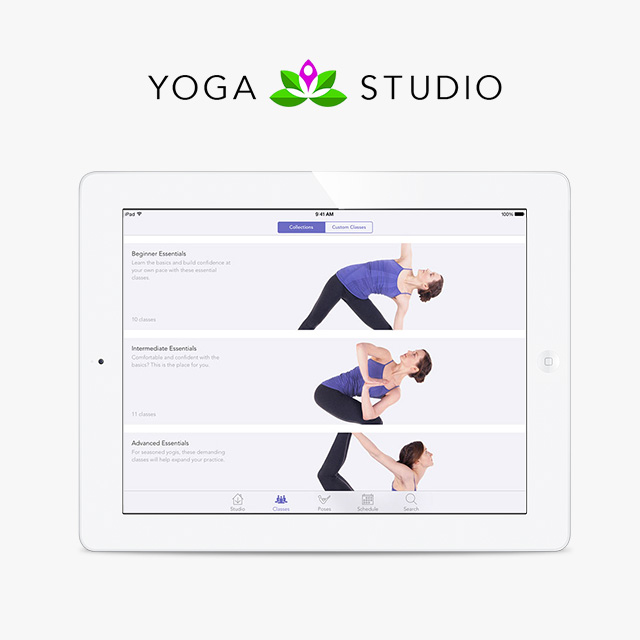 The Gaiam Yoga Studio App includes 65 ready-made classes running from 15 minutes to 30 minutes to 60 minutes in length. The classes target different levels (beginner, intermediate or advanced) and different areas of focus (strength, flexibility, relaxation, balance or combination) — there’s a class for everyone! The app also features a library of over 280 poses with detailed information and instruction.
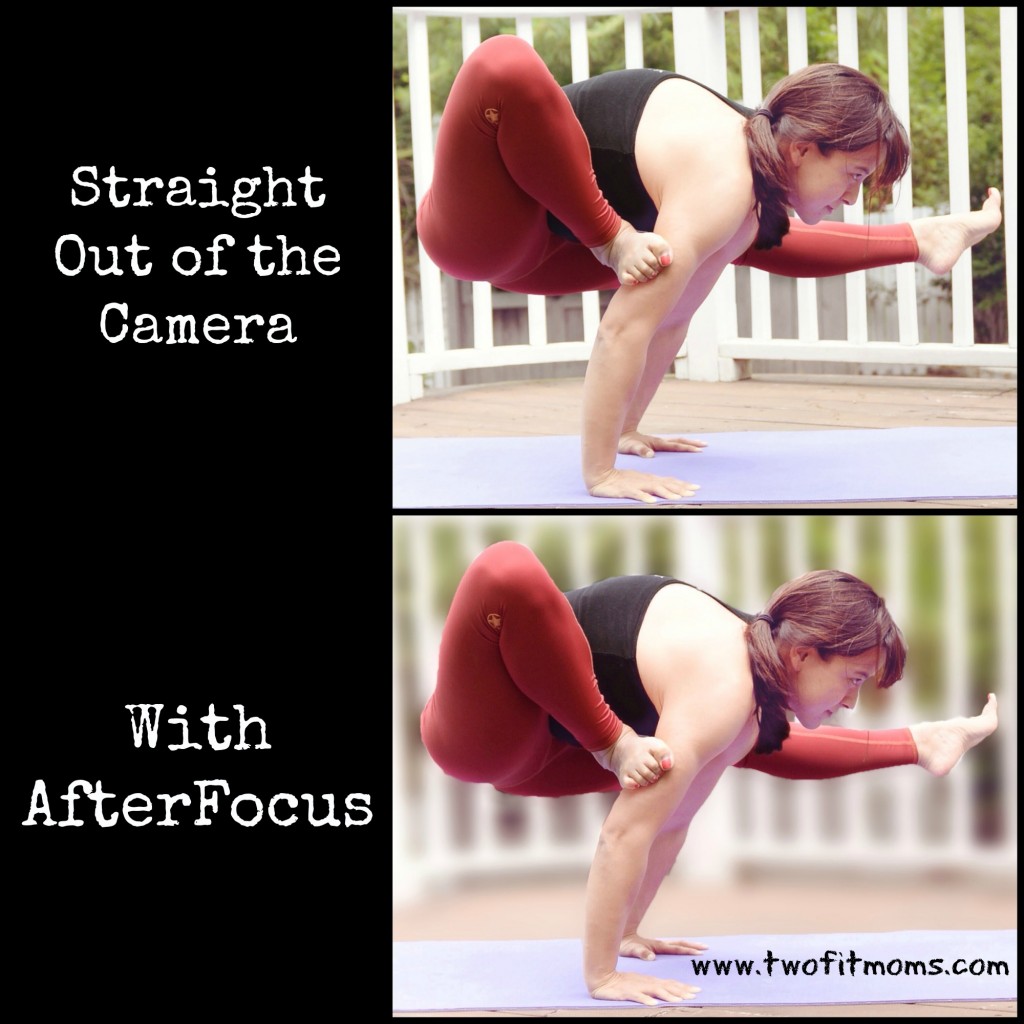 Take a look at my two photos. In the top picture, the white fence in the background isn’t an eyesore, but it is receiving the same amount of attention as the yoga pose. By running the photo through the AfterFocus app, I can blur the fence into the background. This app will automatically recognize your focus object and blur the background, just by drawing a few lines with your finger inside the object of focus.